IV.导入他人项目的注意事项
有时候我们在网上看到优秀的关于springboot的开源代码,就想着下载下来跑一下尝试一下效果,但是发现项目各处都出现了报错的地方,本节想要尽可能提供一些解决方法。
1.项目配置
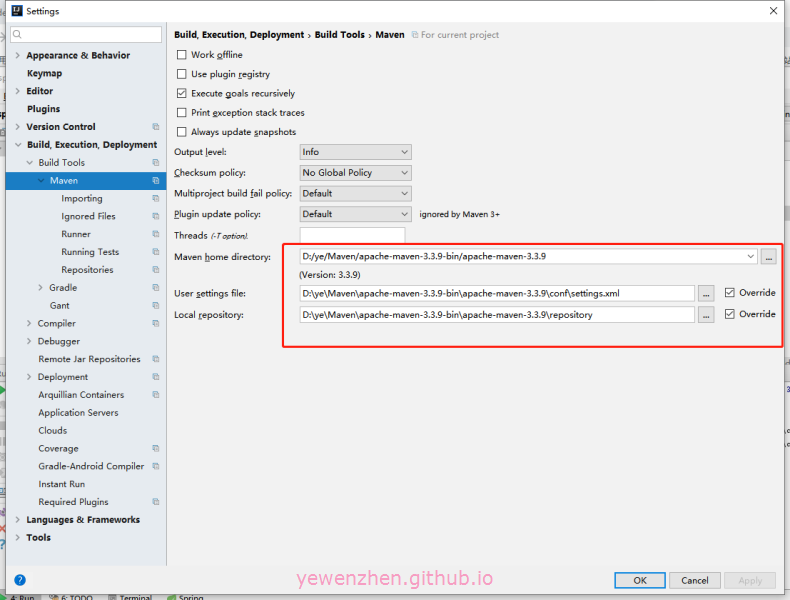
点击file进入setting->Build,Execution,Deployment->Build Tools->Maven,设置成属于自己原来的值。
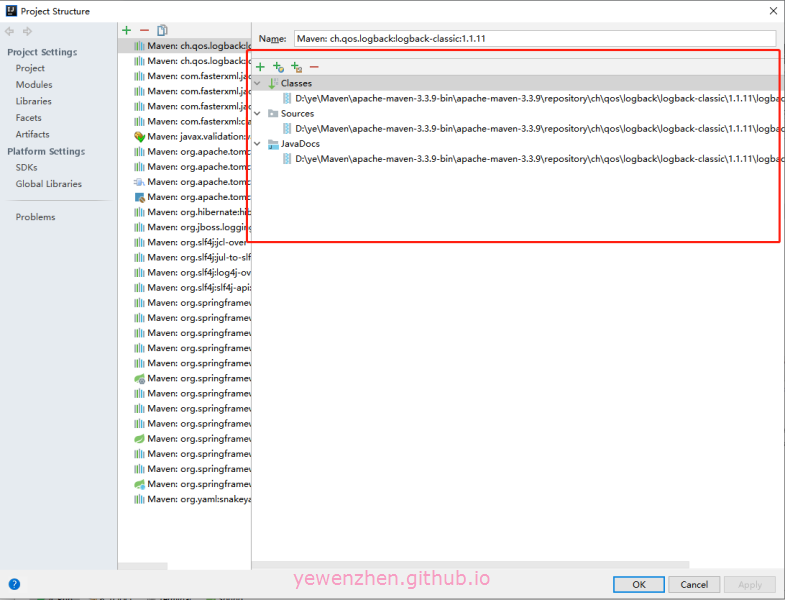
使用快捷键ctrl+shift+Alt+s进入下列页面,设置为自己原来的值(+号添加文件),如果这里不知道怎么设置,可以打开原来自己的项目看相关值。
2.Exrernal Libraries出现库没下载下来
这种情况是很大程度是因为网络问题,添加一个阿里的镜像就可以自动下载了。
1 | <repositories> |
3.假如出现cannot resolve symbol的问题
在前面的工作已经做完的情况下,还出现此类问题时,将鼠标移至问题上,依照提示进行操作。